

When working with NestJS and MongoDB, you’ve got a big decision to make—how do you interact with your database? That’s where ORMs (Object-Relational Mappers) and ODMs (Object-Document Mappers) come in. But what’s the difference between them?
ORMs (Object-Relational Mappers) are primarily designed for relational databases like PostgreSQL and MySQL, where data is stored in structured tables with relationships between them. ODMs (Object-Document Mappers), on the other hand, are specifically built for NoSQL databases like MongoDB, where data is stored in flexible, JSON-like documents rather than structured tables.
These tools save us from writing raw database queries all the time and make working with data a whole lot smoother.
Types of ORMs for MongoDB
In the world of NestJS + MongoDB, three big players stand out: TypeORM, Prisma, and Mongoose. But which one should you pick? And more importantly—why?
TypeORM
TypeORM is one of the most well-known ORMs in the TypeScript ecosystem. It was originally built for SQL databases like PostgreSQL and MySQL but also offers limited support for MongoDB. The idea behind TypeORM is to let you work with your database using TypeScript classes and decorators, making your code look clean and structured.
Bottom line? If you’re using MongoDB, TypeORM isn’t your best bet. It’s great for relational databases, but it lacks native support for document-based databases like MongoDB. TypeORM was not created for NoSQL databases.
Mongoose
Mongoose is the go-to ODM (Object-Document Mapper) for MongoDB in the Node.js ecosystem. It helps you define schemas, validate data, and interact with MongoDB using models, making it much easier to work with structured data.
If you’ve worked with MongoDB before, you’ve probably used Mongoose. It’s reliable, but for people who love TypeScript, Prisma might offer a smoother experience.
Prisma
Prisma is a modern, TypeScript-first ORM that’s designed to simplify database interactions. It started as an SQL-only tool but now supports MongoDB as well. Instead of writing MongoDB queries manually or dealing with Mongoose’s schema quirks, Prisma lets you use a declarative approach with a schema file that auto-generates TypeScript types for you.
Prisma is gaining traction fast, especially for people coming from SQL-based ORMs. But is it the right choice for MongoDB? Let’s compare it to Mongoose directly.
| Feature | Prisma | Mongoose |
| TypeScript Support | Built-in, strong typings with auto-generated types | Requires manual typings, less TypeScript-friendly |
| Schema Definition | Uses a separate .prisma schema file | Uses JavaScript/TypeScript schema in models |
| Querying Data | More structured, SQL-like queries | More flexible, native MongoDB-style queries |
| Ease of Use | Easier for TypeScript users, less boilerplate | Requires more manual setup but gives more control |
| Performance | Slightly higher overhead due to abstraction | Directly interacts with MongoDB, generally faster |
| Maturity & Ecosystem | Newer to MongoDB, still evolving | Well-established, battle-tested for MongoDB |
| Flexibility | More opinionated, better for structured apps | Highly flexible, great for complex queries |
| Built-in Features | Includes Prisma Studio for data management | Has middleware, hooks, and plugins for customization |
| Learning Curve | Easier for SQL users, simple setup | More complex, requires learning MongoDB deeply |
Popularity & Community
According to npmtrends.com, Prisma has been gaining traction rapidly, and at the beginning of 2025, it surpassed Mongoose in the number of downloads. This shift highlights Prisma’s growing adoption, particularly in the TypeScript and NestJS ecosystems.
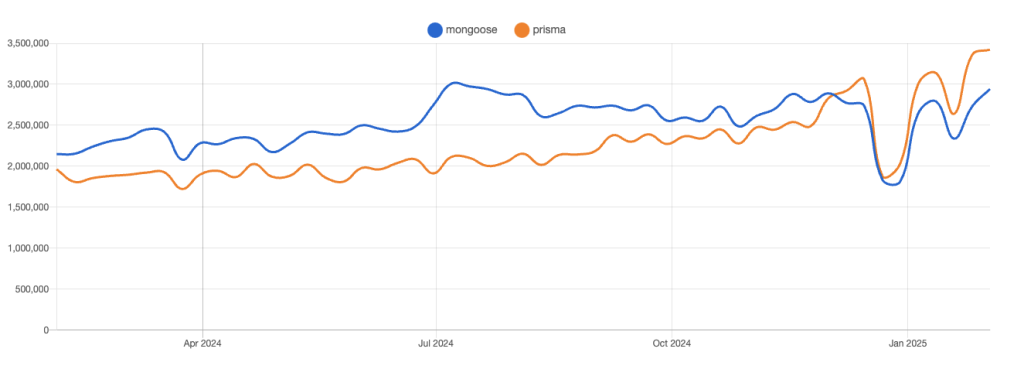
While a large portion of Prisma’s downloads still come from SQL-based projects, its expanding MongoDB support suggests an increasing number of developers are considering it as an alternative to Mongoose. This trend signals strong community backing, continuous improvement, and growing confidence in Prisma’s ability to handle NoSQL workloads.
Mongoose, on the other hand, remains a reliable and widely used choice for MongoDB, benefiting from years of battle-tested stability and a vast ecosystem of plugins and resources. Despite Prisma’s rise, Mongoose isn’t going anywhere—it still dominates in projects that demand deep MongoDB integration and flexibility.
Query examples: Prisma vs Mongoose
When working with MongoDB in NestJS, you need to interact with your database efficiently. Below, we’ll compare common queries using Prisma and Mongoose to see their differences in syntax, flexibility, and usability.
Defining a Model
Prisma
|
1 2 3 4 5 |
model User { id String @id @default(autoincrement()) name String email String @unique } |
Then, to generate a Typescript client:
|
1 |
npx prisma generate |
This command creates a Prisma client tailored to your database schema, ensuring type safety in your queries.
Creating a user with the generated client in NestJS:
|
1 2 3 4 5 6 7 8 9 10 |
import { PrismaClient, User } from ‘@prisma/client’; const prisma = new PrismaClient(); async function registerUser( registerUserDTO: RegisterUserDTO ): Promise<User> { return prisma.user.create({ data: registerUserDTO, }); } |
Fetching a User by Email
|
1 2 3 |
const user = await prisma.user.findUnique({ where: { email: ‘john@example.com’ }, }); |
Mongoose
Unlike Prisma, which generates a TypeScript client, Mongoose follows a more traditional model-based approach.
Creating a schema
|
1 2 3 4 5 6 7 8 |
import { Schema, model } from ‘mongoose’; const UserSchema = new Schema({ name: String, email: { type: String, unique: true }, }); const User = model(‘User’, UserSchema); |
Creating a user
|
1 2 3 4 5 |
const user = new User({ name: ‘John Doe’, email: ‘john@example.com’, }); await user.save(); |
Fetching a User by Email
|
1 2 3 |
const user = await User.findOne({ email: ‘john@example.com’, }); |
Key Differences Observed:
Prisma offers a more structured approach, with strong TypeScript support and auto-generated types.
Mongoose provides greater flexibility with native MongoDB queries and schema hooks.
Prisma follows a SQL-like query pattern, making it more intuitive for developers coming from relational databases.
Mongoose allows more granular control over MongoDB features, such as middleware, indexing, and custom query optimizations.
Performance comparison
MongoDB is a NoSQL database that stores data in a flexible, JSON-like document format. Mongoose directly interacts with MongoDB, by sending raw MongoDB queries without an additional translation layer. It uses native MongoDB commands like find(), aggregate(), and updateOne() directly, allowing full control over how data is retrieved and manipuleted.
Prisma, on the other hand, introduces an abstraction layer, that converts queries written in its own syntax into MongoDB operations. This adds overhead, as Prisma needs to interpret and transform high-level ORM queries into low-level database interactions. While this abstraction improves developer experience, readability, and type-safety, it could impact performance on complex queries.
| Feature | Prisma | Mongoose |
| Query Execution Speed | Slower (abstraction overhead) | Faster (direct MongoDB interaction) |
| Indexing & Optimization | Basic indexing support | Advanced indexing and query tuning |
| Bulk Operations | Limited support | Full MongoDB bulk operations |
| Connection Management | Requires manual disconnect | Automatic reconnection |
| Memory & Resource Usage | Higher due to abstraction | Lower, optimized for performance |
If performance is your primary concern, Mongoose is the better choice for MongoDB due to its direct interaction with the database, better indexing control, and lower resource consumption.
When to use what?
Now that we understand the key differences, let’s talk about use cases. When should you choose Prisma over Mongoose in a MongoDB project?
Prisma is a way to go if:
- You love TypeScript and want auto-generated types for safety and speed.
- You prefer a structured, SQL-like approach to database queries.
- You’re building an app with a stable schema that won’t change dynamically.
- You’re new to both ORMs—Prisma is easier to learn, and the knowledge is transferable to SQL-based projects.
Mongoose is your pick when:
- Your data evolves frequently, and you want schema flexibility,
- Performance is key, and you want direct MongoDB queries without abstraction overhead,
- You need a battle-tested ORM built specifically for MongoDB, offering deep integration, middleware, and advanced indexing.
Final thoughts
I’ve worked with both Prisma and Mongoose, and I can confidently say that both are great choices—it all depends on your project’s needs.
Prisma is fantastic if you love TypeScript, strict typings, and a structured approach. It makes database interactions easier and feels more modern, especially if you’re coming from SQL. However, since it’s newer to MongoDB, it still has some limitations compared to native MongoDB tools.
Mongoose, on the other hand, has been around for years, and from my experience, it’s the more stable and reliable choice. It gives you full control over MongoDB’s native features, better performance, and a flexible schema that adapts as your data evolves.
Leave a Reply