• Why ‘John’ Isn’t ‘john’: Deep Dive into Collation with NestJS

    Imagine this: You have deployed your latest feature: a universal search across all your enterprise data. It’s fast, sleek, and uses intelligent matching. Look at you, I’m so proud.

    Then the feedback comes back from the client:

    Searching for Apple doesn’t find apple,

    My dashboard shows users in a different order than the admin panel,

    I can register with the username john, but when I try to register John it says username already existsin one system, but allows it in another system

    You check your code – WHERE clauses are correct, your ORDER BY statements too. You have UTF8 encoding in all your systems. So what is going on?

    Welcome to the world of Data Collation, a silent dictator that tells your databases how to interpret the characters they store. In that article, I will try to explain how to interact with diverse databases in a NestJS application.

    First things first

    To understand the impact of collation, we’ll build a simple NestJS app that interacts with two different SQL databases:

    • MySQL: Configured with a common case-insensitive collation
    • PostgreSQL: Configured with a common case-sensitive collation.

    The Technology Stack for the API

    • You can find the repository for the article right here,
    • Docker and Docker Compose
    • Node.js + NestJS CLI

    Setting up the NestJS Project

    I assume You know how to create a basic NestJS Project. If not, you can easily check it out in the official NestJS documentation.

    The easiest way to simulate a multi-database environment with specific collations is using Docker. Create a  dockercompose.yml file in the root of your project.

    docker-compose.yml

    What has happened here?

    • mysql_ci: We explicitly set the server’s collation to  utf8mb4_unicode_ci. The  _ci suffix stands for case-insensitive.
    • postgres_cs: We set the locale for collation ( lc_collate) and character classification ( lc_ctype) to “C”. The “C” or “POSIX” locale enforces a binary, byte-by-byte comparison, which is inherently case-sensitive.

    Connecting NestJS to both databases:

    app.module.ts

    We will create a User entity with the @Unique decorator for science!

    src/users/entities/user.entity.ts

    Now, let’s implement the demo Users Service. We inject both database connections and create methods to interact with them, to showcase the differences.

    src/users/users.service.ts

    Putting theory into practice

    To demonstrate the practical impact of case sensitivity, we will perform a series of API calls to create and find users in both MySQL and PostgreSQL.

    Part 1: MySQL (The Case-Insensitive Database)

    By default, MySQL string comparisons are case-insensitive. Let’s see what this means when creating and searching for users.

    Step 1: Creating Users
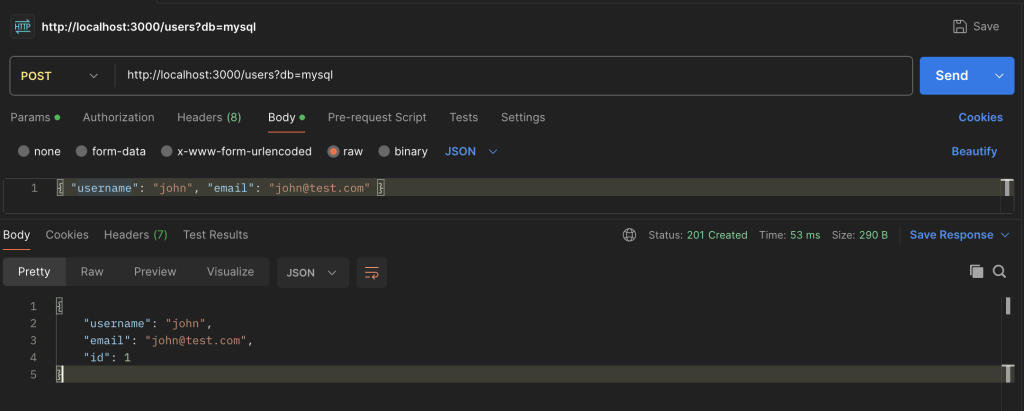
    Request 1: Create “john”

    Result: Success! The user john is created as expected.

    Now for the crucial test. Let’s try to create another user, John, with a capital letter.
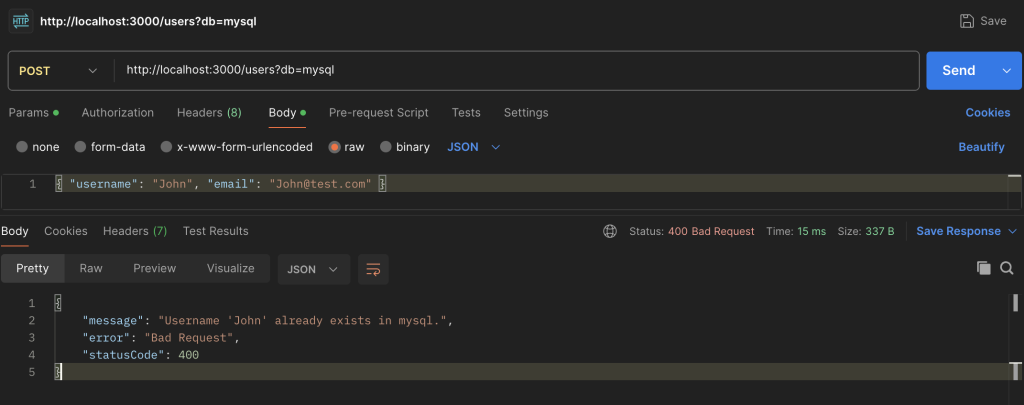
    Result: FAILURE! 400 Bad Request.

    Conclusion: The database considers john and John to be identical, so it rejects the second request as a duplicate entry.

    Step 2: Searching for Users

    Now let’s see how searching works. We’ll search for the user we created (john), first using the exact case and then a different case.

    Search 1: Find “john”

    Result: The user john is found successfully.

    Search 2: Find “John”

    Result: The exact same user (john) is found again.

    Conclusion: For MySQL, case doesn’t matter during a search. Both john and John point to the same record.

    Part 2: PostgreSQL (The Case-Sensitive Database)

    PostgreSQL, on the other hand, performs case-sensitive string comparisons by default. Let’s repeat the same experiment.

    Step 1: Creating Users

    Request 1: Create “john”

    Result: Success! The user john is created.

    Now, let’s try creating John again. Unlike in MySQL, we expect a different outcome.

    Request 2: Create “John”

    Result: Success! A second, distinct user is created.

    Conclusion: PostgreSQL treats john and John as two completely different strings, allowing both to exist in the database.

    Step 2: Searching for Users

    This is where the difference becomes most apparent to the end-user.

    Search 1: Find “john”

    Result: Finds the user john.

    Search 2: Find “John”

    Result: Finds the user John. Each search returns its own specific record.

    To drive the point home, let’s try searching for a user that doesn’t exist. We’ll create Apple and then search for apple.

    Search 3: Find “apple” (when only “Apple” exists)

    Result: null. No user is found.

    Conclusion: The search is exact. If the case doesn’t match perfectly, PostgreSQL won’t find the record.

    Solving the problem

    Now, how do we fix this and enforce consistent behavior?

    Solution 1: Explicit Collation in Queries

    You can override the default collation directly in your query. This is useful when you need specific behavior for a single query without changing the database schema.

    Let’s create a new method in our service for a case-sensitive search.

    src/users/users.service.ts

    • We use TypeORM’s QueryBuilder for more control.
    • COLLATE utf8mb4_bin: This tells MySQL to perform a binary (_bin) comparison for this query only, ignoring the table’s default _ci collation.
    • COLLATE “C”: This tells PostgreSQL to use the binary-safe “C” collation, ensuring a strict, byte-for-byte comparison.

    Solution 2: Enforcing Case-Insensitive Search

    What if you want the opposite? You want PostgreSQL to behave like our case-insensitive MySQL.

    • ILIKE: This is a PostgreSQL-specific operator that performs a case-insensitive  LIKE operation.
    • Alternative (more portable): Using  LOWER() on both the column and the input value (LOWER(user.username) = LOWER(:username)) works across most SQL databases.

    Summary

    As we’ve seen, data collation is a powerful and critical database feature that directly impacts how your application behaves.

    By understanding how to identify these issues and using tools like TypeORM’s QueryBuilder or application-level normalization, you can regain control and ensure your application provides a consistent, predictable experience for your users, no matter what database is running behind the scenes.

    Don’t let the silent dictator rule your data. Acknowledge it, understand it, and make it work for you.
  • Next.js + Bun #2 – A Modern Backend with Route Handlers, Prisma & PostgreSQL

    Next.js allows us to build full, scalable e2e applications. In this article, we will explore together how to create and maintain a Next.js API, in the same repository as the UI layer.

    Why combine the API and UI?

    Creating an API combined with UI is not considered a standard pattern. Usually, we separate those two things for reasons such as performance, scaling, and team structure. For example, frontend devs can work independently from backend teams, and services can be deployed separately.

    So why and when would we actually want to combine that?

    One of the best things about Next.js APIs is how flexible they are. You can use them as a shared backend for multiple clients, like your web app, a mobile app, or even third-party integrations.

    They also work great as a middle layer. If you want to hide external services or clean up messy data before it reaches the frontend, route handlers give you a clean way to do that.

    Even custom auth is possible. Whether you’re managing sessions, tokens, or cookies, it can all live in your Next.js API without needing a separate backend service.

    Also, maybe you have a small application to write, and it’s fun to have everything in one place.

    The Technology Stack for the API

    • You can find repository for the article right here,
    • Prisma as TypeOrm,
    • Dockerized PostgreSQL database

    Files setup

    Next.js in version 13 introduced web standard Request/Response APIs, where you can create route.ts files anywhere inside the app/ directory. To keep the API layer separately, this is how I organized my files

    As you can already see, we have to keep dynamic paths like api/users/:id separately, using dynamic segments.

    Setting up TypeOrm

    As mentioned above, our ORM of choice is Prisma. You can find out why I personally like it in this article.

    First, let’s install the necessary dependencies. We need the Prisma Client for our application code and the Prisma CLI as a development tool for migrations and generation.

    Now, let’s initialize Prisma in our project. This command will create a new Prisma directory containing a  schema.prisma file and an .env file for your database connection string.

    This creates the following structure:

    The  prisma/schema.prisma file is the heart of your setup. It’s a single source of truth where you define your database connection, client generator, and all your data models.

    Let’s edit this file to include our User and Family models. All models live together in this one file.

    prisma/schema.prisma

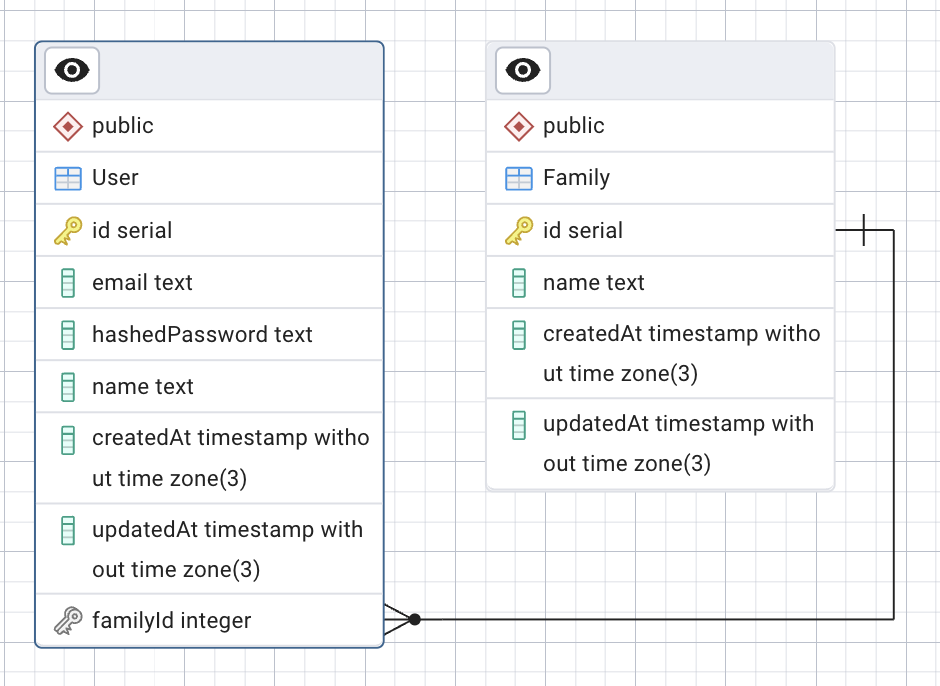
    In our schema, we’ve established a many-to-many relationship between users and families. This means:

    • A single  User can be a member of multiple  Family groups.
    • A single  Family can contain multiple  User members.

    This is achieved using two key features in the schema:

    1. List Fields ([]): The families Family[] and members User[] syntax tells Prisma that these fields will hold a list of related records.
    2. The @relation Attribute: The  @relation(“FamilyMembers”) attribute explicitly connects the User.families field to the  Family.members field, defining them as two sides of the same relationship.

    Behind the scenes, when you migrate your database, Prisma will automatically create a hidden “join table” (in this case,  _FamilyMembers) to manage these connections. This powerful feature keeps your schema clean and abstracts away the underlying database complexity.

    Database Diagram generated in pgAdmin

    Now, with the command

    We are generating the Prisma Client based on our schema files. This is an auto-generated query builder that provides autocomplete in the editor, assists with data types, and generates a clean and readable API for interacting with your database.

    For example, fetching users is as simple as:

    Before we create our first endpoints, we also have to create a Prisma client setup, so that we don’t initialize it every time.

    src/api/lib/prisma.ts

    Creating your database in docker

    Every server needs a database. For this project, we will use PostgreSQL.

    First of all, I recommend installing the desktop version of docker. Then we can create a new database using a simple Docker Compose file.

    First, let’s create a dockercompose.yml file in your project. This is an “instruction” on how to create a Docker image that will meet standards for the project.

    doker-compose.yml

    Now let’s update our .env file with the database connection string

    You can start a container with

    Your PostgreSQL database should now be running in Docker on port 5433.

    We can finally create the initial SQL migration using Prisma with

    The SQL migration helps us track changes in the database schema. Every time we migrate, Prisma creates a migration file with the changes that we want to apply. This is very helpful to keep track of what has historically happened with the database structure.

    After your initial migration, You should greeted with message as below:

    Prisma has created a new path with your initial migration in the migrations/ folder. If other developers were to fetch our project, they could very simply apply all existing migrations to their fresh local database with the command

    Great! We have successfully created the initial setup to start working with our api. We have deployed our first migration on a dockerized database, and are ready to go.

    Securing passwords

    Before we create users, there’s a crucial aspect of user management we need to address: passwords. For this, we will utilize a widely used technique known as hashing. Hashing transforms a password into a fixed-length string of characters, “the hash”, using a one-way algorithm.

    What does it mean? It’s impossible to reverse a hash back to the original password. When a user tries to log in, we hash the password they provide and compare it to the stored hash.

    Fortunately, if we’re using the Bun runtime, we have a powerful, built-in tool for this:  Bun.password. The  Bun.password API provides access to modern, secure hashing algorithms like  Argon2 and  bcrypt.

    These algorithms are intentionally slow and resource-intensive. This design makes them much more resistant to brute-force attacks where an attacker tries to guess passwords by hashing millions of possibilities per second.

    Bun.password also handles salting automatically. Salting adds a random piece of data to the hashing process, ensuring that even if two users have the same password, their stored hashes will be completely different.

    The best part is that since this is built into Bun, there are no external dependencies to install. We can jump straight into the code.

    Let’s create our user endpoint:

    src/api/users/route.ts

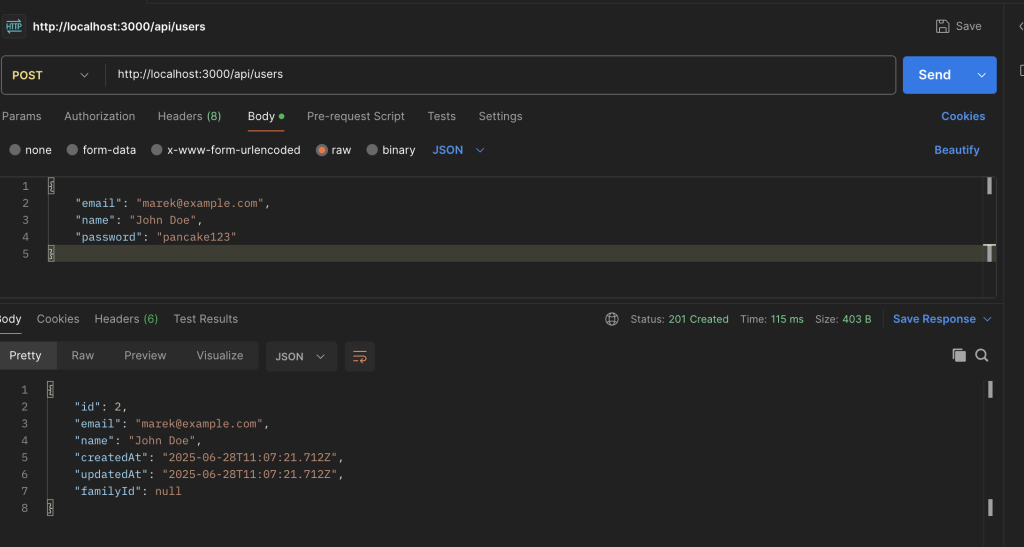
    Now Let’s try our first endpoint out.

    Voilà! Our first user has been created. We can see the results by running

    This will open up a window in our browser with database visualisation.

    Summary

    In this guide, we walked through a process of building a robust backend API right inside a Next.js application.

    We have used a powerful combo that has become my go-to stack: Prisma for the ORM, a Dockerized PostgreSQL database, and Bun’s built-in password hashing for top-notch security.

    I’m a huge fan of this integrated approach because it’s not just for quick side-projects; it gives you incredible flexibility to build a unified middle layer, clean up data from external services, and even handle custom authentication without the complexity of a separate server.

  • Next.js + Bun #1 – Your First Steps to Building a High-Performance App

    In recent years, client-side Single-Page Applications have become incredibly popular for various reasons. By embracing the SPA (Single-Page Application) model, developers now build pages that offer a level of interactivity previously unattainable.

    For instance, when using React in its typical client-rendering approach, the server initially delivers an almost empty HTML page along with the necessary JavaScript files, allowing the browser to generate the visible content. This method significantly reduces the load on the server, but it can also strain the browser, potentially degrading the user experience on less powerful devices. Additionally, there are SEO (Search engine optimization) concerns to consider—Google’s documentation notes that processing JavaScript can be challenging, and not all search engine crawlers can handle it effectively or immediately.

    Why Next.js?

    In this series of articles, we will build a Next.js project and explore its features step by step. The project will run on Bun, and the code can be found in this repository

    How Next.js Extends React

    React is primarily a client-side rendering (CSR) library, relying on the browser to fetch and render content. This can lead to slower initial loads and SEO challenges.

    Next.js extends React with multiple rendering strategies:

    • Server-Side Rendering (SSR) – Pages are generated per request for fresh content and better SEO.
    • Static Site Generation (SSG) – Pages are pre-built for faster performance.
    • Incremental Static Regeneration (ISR) – Allows updating static pages without a full rebuild.

    In addition to these rendering strategies, Next.js also includes several built-in features that make development smoother and performance better:

    • File-based routing – Routes are automatically created based on the file structure inside the app or pages directory.
    • API routes – You can define backend endpoints directly in your project, without setting up a separate server.
    • Image optimization – The built-in <Image /> component automatically optimizes images for size, format, and loading behavior.

    Rendering strategies

    The way Next.js renders a page directly impacts performance, SEO, and user experience. Each approach is suited for different needs:

    Client-Side Rendering (CSR)

    With CSR, the browser fetches JavaScript and renders content dynamically. This can lead to slow initial page loads.

    Server-Side Rendering (SSR)

    Next.js fetches data on every request and renders it on the server.

    Static Site Generation (SSG)

    Next.js pre-builds the page at compile time, meaning the HTML is generated ahead of time—during the build process—not on each user request. Basically, when someone visits your page, the server simply serves this ready-made HTML file, which makes loading the page extremely fast.

    This approach reduces the work needed at runtime, leading to better performance, especially under high traffic. It also improves SEO, since search engine crawlers get fully-rendered HTML immediately.

    SSG is ideal for content that doesn’t change too often—like blogs, marketing pages, or documentation.

    A popular alternative focused on SSG is Gatsby, which also pre-generates static content and works well for content-heavy sites.

    Incremental Static Regeneration (ISR)

    Next.js updates static pages without a full rebuild.

    Rendering MethodInitial Load TimeSEOBest for
    CSRSlowPoorInteractive apps that don’t require SEO
    SSRMediumDecentDynamic content that needs SEO
    SSGFastGoodStatic sites with infrequent updates
    ISRFastGoodStatic pages that need periodic updates
    Performance Comparison: CSR vs. SSR vs. SSG

    Now, you may wonder: Why do we need to understand these strategies? Which one is right for my app? Well, it depends on your needs. We need to understand the requirements of our app and choose the best approach.

    For example, if you’re building a blog or news website, SSR would be a great choice, as it fetches data on each request and ensures the content is SEO-friendly.
    On the other hand, if you’re working on a chat app, CSR could be a better fit since SEO isn’t a priority, and fast, dynamic interactivity is essential.

    Understanding these strategies helps you tailor your app’s performance and SEO optimally based on the content and interactivity needed.

    Project initialization

    Next.js runs both on the server (for SSR/SSG) and the client (for interactivity). To execute JavaScript outside the browser—such as rendering pages on the server or handling API routes—we need a JavaScript runtime like Node.js or Bun.

    Bun is a modern JavaScript runtime, faster than Node.js. It comes with a built-in bundler, test runner, and package manager. I chose Bun for its speed and simplicity, and also to try it out because I never had a chance

    Bun provides a built-in command to quickly scaffold a new Next.js application:

    This command initializes a new Next.js project and installs all dependencies. You will need to answer a few questions from the installer based on your preferences.

    Understanding Next.js Routing

    Next.js simplifies routing with its file-based routing system, eliminating the need for external routing libraries. This system automatically maps files inside the src/app directory to application routes.

    File-based routing

    Each file inside the src/app directory corresponds to a route:

    • src/app/page.tsx/ (Home route)
    • src/app/about/page.tsx/about

    Nested routes

    You can create nested routes by organizing files into folders. For example, placing page.tsx inside an about folder creates a nested route at /about.

    Dynamic routes

    Next.js supports dynamic routes using square brackets:

    src/app/post/[id].tsx → Matches /post/1, /post/2, etc.

    Example Routing Structure

    App routing cache provider

    In our layout, I have also added a AppRouterCacheProvider component from @mui/materialnextjs.

    This package helps optimizing the performance of your Next.js app. Here is how it works:

    • CSS Injection: It ensures that CSS is injected correctly during server-side rendering, preventing style flickering during page transitions.
    • Cache Management: It manages caching for the App Router, which helps in reducing the load time by caching static assets and styles.
    • Seamless Transitions: By managing the cache, it allows for smoother transitions between pages, enhancing the user experience.

    Summary

    In this article, we unlocked the power of Next.js and how it can supercharge your app’s performance and SEO. We saw how client-side rendering (CSR) falls short and how Next.js steps in with SSR, SSG, and ISR to solve those problems.

    We broke down which strategy is perfect for different scenarios — like SSR for blogs and CSR for chat apps — helping you make smarter choices for your projects.

    We also touched on getting started with a Next.js project, routing, and performance boosts with tools like AppRouterCacheProvider.

    In the next article, we’ll take things a step further and build an API with Next.js.

  • Navigating ORM Choices: A Practical Comparison of Prisma, TypeORM and Mongoose in Your NestJS MongoDB Project

    When working with NestJS and MongoDB, you’ve got a big decision to make—how do you interact with your database? That’s where ORMs (Object-Relational Mappers) and ODMs (Object-Document Mappers) come in. But what’s the difference between them?

    ORMs (Object-Relational Mappers) are primarily designed for relational databases like PostgreSQL and MySQL, where data is stored in structured tables with relationships between them. ODMs (Object-Document Mappers), on the other hand, are specifically built for NoSQL databases like MongoDB, where data is stored in flexible, JSON-like documents rather than structured tables.

    These tools save us from writing raw database queries all the time and make working with data a whole lot smoother.

    Types of ORMs for MongoDB

    In the world of NestJS + MongoDB, three big players stand out: TypeORM, Prisma, and Mongoose. But which one should you pick? And more importantly—why?

    TypeORM

    TypeORM is one of the most well-known ORMs in the TypeScript ecosystem. It was originally built for SQL databases like PostgreSQL and MySQL but also offers limited support for MongoDB. The idea behind TypeORM is to let you work with your database using TypeScript classes and decorators, making your code look clean and structured.

    Bottom line? If you’re using MongoDB, TypeORM isn’t your best bet. It’s great for relational databases, but it lacks native support for document-based databases like MongoDB. TypeORM was not created for NoSQL databases.

    Mongoose

    Mongoose is the go-to ODM (Object-Document Mapper) for MongoDB in the Node.js ecosystem. It helps you define schemas, validate data, and interact with MongoDB using models, making it much easier to work with structured data.

    If you’ve worked with MongoDB before, you’ve probably used Mongoose. It’s reliable, but for people who love TypeScript, Prisma might offer a smoother experience.

    Prisma

    Prisma is a modern, TypeScript-first ORM that’s designed to simplify database interactions. It started as an SQL-only tool but now supports MongoDB as well. Instead of writing MongoDB queries manually or dealing with Mongoose’s schema quirks, Prisma lets you use a declarative approach with a schema file that auto-generates TypeScript types for you.

    Prisma is gaining traction fast, especially for people coming from SQL-based ORMs. But is it the right choice for MongoDB? Let’s compare it to Mongoose directly.

    FeaturePrismaMongoose
    TypeScript SupportBuilt-in, strong typings with auto-generated typesRequires manual typings, less TypeScript-friendly
    Schema DefinitionUses a separate .prisma schema fileUses JavaScript/TypeScript schema in models
    Querying DataMore structured, SQL-like queriesMore flexible, native MongoDB-style queries
    Ease of UseEasier for TypeScript users, less boilerplateRequires more manual setup but gives more control
    PerformanceSlightly higher overhead due to abstractionDirectly interacts with MongoDB, generally faster
    Maturity & EcosystemNewer to MongoDB, still evolvingWell-established, battle-tested for MongoDB
    FlexibilityMore opinionated, better for structured appsHighly flexible, great for complex queries
    Built-in FeaturesIncludes Prisma Studio for data managementHas middleware, hooks, and plugins for customization
    Learning CurveEasier for SQL users, simple setupMore complex, requires learning MongoDB deeply
    Head-to-Head comparison Prisma vs Mongoose

    Popularity & Community

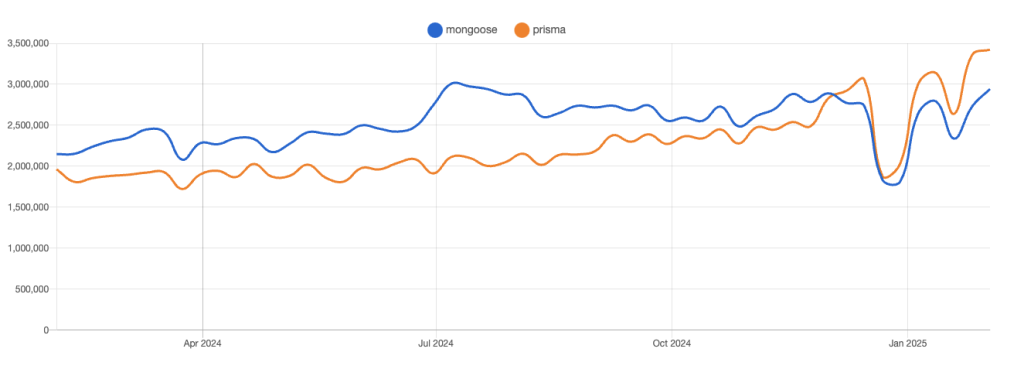
    According to npmtrends.com, Prisma has been gaining traction rapidly, and at the beginning of 2025, it surpassed Mongoose in the number of downloads. This shift highlights Prisma’s growing adoption, particularly in the TypeScript and NestJS ecosystems.

    Mongoose vs Prisma download popularity over a year

    While a large portion of Prisma’s downloads still come from SQL-based projects, its expanding MongoDB support suggests an increasing number of developers are considering it as an alternative to Mongoose. This trend signals strong community backing, continuous improvement, and growing confidence in Prisma’s ability to handle NoSQL workloads.

    Mongoose, on the other hand, remains a reliable and widely used choice for MongoDB, benefiting from years of battle-tested stability and a vast ecosystem of plugins and resources. Despite Prisma’s rise, Mongoose isn’t going anywhere—it still dominates in projects that demand deep MongoDB integration and flexibility.

    Query examples: Prisma vs Mongoose

    When working with MongoDB in NestJS, you need to interact with your database efficiently. Below, we’ll compare common queries using Prisma and Mongoose to see their differences in syntax, flexibility, and usability.

    Defining a Model

    Prisma

    Then, to generate a Typescript client:

    This command creates a Prisma client tailored to your database schema, ensuring type safety in your queries.

    Creating a user with the generated client in NestJS:

    Fetching a User by Email

    Mongoose

    Unlike Prisma, which generates a TypeScript client, Mongoose follows a more traditional model-based approach.

    Creating a schema

    Creating a user

    Fetching a User by Email

    Key Differences Observed:

    Prisma offers a more structured approach, with strong TypeScript support and auto-generated types.

    Mongoose provides greater flexibility with native MongoDB queries and schema hooks.

    Prisma follows a SQL-like query pattern, making it more intuitive for developers coming from relational databases.

    Mongoose allows more granular control over MongoDB features, such as middleware, indexing, and custom query optimizations.

    Performance comparison

    MongoDB is a NoSQL database that stores data in a flexible, JSON-like document format. Mongoose directly interacts with MongoDB, by sending raw MongoDB queries without an additional translation layer. It uses native MongoDB commands like find(), aggregate(), and updateOne() directly, allowing full control over how data is retrieved and manipuleted.

    Prisma, on the other hand, introduces an abstraction layer, that converts queries written in its own syntax into MongoDB operations. This adds overhead, as Prisma needs to interpret and transform high-level ORM queries into low-level database interactions. While this abstraction improves developer experience, readability, and type-safety, it could impact performance on complex queries.

    FeaturePrismaMongoose
    Query Execution SpeedSlower (abstraction overhead)Faster (direct MongoDB interaction)
    Indexing & OptimizationBasic indexing supportAdvanced indexing and query tuning
    Bulk OperationsLimited supportFull MongoDB bulk operations
    Connection ManagementRequires manual disconnectAutomatic reconnection
    Memory & Resource UsageHigher due to abstractionLower, optimized for performance
    Prisma vs Mongoose performance comparison table

    If performance is your primary concern, Mongoose is the better choice for MongoDB due to its direct interaction with the database, better indexing control, and lower resource consumption.

    When to use what?

    Now that we understand the key differences, let’s talk about use cases. When should you choose Prisma over Mongoose in a MongoDB project?

    Prisma is a way to go if:

    • You love TypeScript and want auto-generated types for safety and speed.
    • You prefer a structured, SQL-like approach to database queries.
    • You’re building an app with a stable schema that won’t change dynamically.
    • You’re new to both ORMs—Prisma is easier to learn, and the knowledge is transferable to SQL-based projects.

    Mongoose is your pick when:

    • Your data evolves frequently, and you want schema flexibility,
    • Performance is key, and you want direct MongoDB queries without abstraction overhead,
    • You need a battle-tested ORM built specifically for MongoDB, offering deep integration, middleware, and advanced indexing.

    Final thoughts

    I’ve worked with both Prisma and Mongoose, and I can confidently say that both are great choices—it all depends on your project’s needs.

    Prisma is fantastic if you love TypeScript, strict typings, and a structured approach. It makes database interactions easier and feels more modern, especially if you’re coming from SQL. However, since it’s newer to MongoDB, it still has some limitations compared to native MongoDB tools.

    Mongoose, on the other hand, has been around for years, and from my experience, it’s the more stable and reliable choice. It gives you full control over MongoDB’s native features, better performance, and a flexible schema that adapts as your data evolves.

  • Improving Query Performance with Compound Indexes in MongoDB

    Have you ever noticed that some MongoDB queries slow down when filtering on more than one field? In our previous discussion, we looked at single-field indexes. While those are great for simple lookups, they often fall short when your queries need to be filtered or sort by multiple fields. In this article, we’ll walk through a real-world scenario, explain the limitations of single-field indexes, and show you how compound indexes can solve the problem.

    A Quick Real-World Scenario

    Imagine you’re building an application that stores user data. You might need to filter users based on several criteria. For example, you may want to retrieve users located in Gdansk. Additionally, you might filter by email addresses ending in @example.com, an active account status, and a signup date on or after January 1, 2024.

    Although this query filters on four fields, the performance-critical part is often filtered by location and email.

    If you only have a single-field index on location, MongoDB would first narrow down the documents by city and then apply the other filters one by one, which can be slow when dealing with millions of records.

    The solution: compound index

    A compound index is an index that includes multiple fields from a document in a specified order. This order is crucial because it determines which queries can fully leverage the index. With a compound index, MongoDB can apply several filters in a single, efficient lookup.

    Why Use Compound Indexes?

    • Multi-Field Filtering: They allow MongoDB to filter by several fields simultaneously.
    • Optimized Sorting: When queries require sorting by multiple fields, compound indexes can support both filtering and sorting.
    • Improved Performance: By narrowing down the number of documents early, compound indexes significantly reduce query execution time.

    Difference Between Single-Field and Compound Indexes

    Single-Field Index:
    An index on one field (e.g., { age: 1 }) works well for queries filtering solely by that field:

    However, if your query adds additional filters such as email or accountStatus, a single-field index may not fully optimize it.

    An index that includes multiple fields like

    { age: 1, email: 1 } is designed to handle queries that filter on both fields efficiently:

    This compound index enables MongoDB to locate matching documents faster by applying both filters in a single index lookup.

    Stack requirments

    This article demonstrates examples using the following technologies:

    • Backend: NestJS with TypeScript and Mongoose
    • Database: A Dockerized MongoDB instance
    • Repository: The code for this article can be found here.

    Implementing Compound indexes in NestJS with Moongoose

    Below is an updated version of your existing User schema. It contains a compound index on the age and email fields. We can add it using the index method built into Mongoose.

    user.schema.ts

    How these indexes help

    Index { age: 1, email: 1 }

    • Optimizes queries that filter by age or by both age and email.
    • Supports sorting by age and then by email (if needed).
    • Directly benefits queries that use these two fields as primary filters.

    Index { location: 1, age: 1 }

    Ideal for queries filtering by location and sorting results by age in descending order.

    Example usage:

    Using { location: 1, age: 1 } ensures that when filtering by location, the results are also sorted by age from highest to lowest.

    For more complex queries, consider using a compound index that covers all critical fields. Always design indexes based on the most frequent and performance-critical query patterns in your application.

    Additional Indexing Strategies

    Sorting with Compound Indexes

    If queries need to sort users first by location and then by email, our existing compound index { location: 1, email: 1 } can optimize this operation:

    However, sorting by email first and then location requires a different index { email: 1, location: 1 }, which is not covered by the previous index.

    Partial Indexes for Optimization

    If some fields aren’t present in every document, a partial index can reduce the index size and improve performance:

    This reduces the index size and speeds up queries that frequently filter by location.

    Other data optimization techniques

    Apart from indexes, there are other ways to optimize data storage and queries in MongoDB:

    • Efficient Schema Design: Embed small related documents to reduce joins, reference large shared objects.
    • Sharding: Distribute large datasets across multiple shards using an even-distributed shard key.
    • Aggregation Optimization: Use $match early, $project to minimize memory usage, and optimize $lookup operations.
    • Write Performance: Use bulkWrite() for batch inserts, tune WriteConcern, and minimize indexed field updates.
    • Caching: Store frequently accessed query results in Redis or in-memory storage to reduce database load.

    Summary

    Compound indexes are a powerful tool to optimize MongoDB queries involving multiple fields. By strategically choosing index orders and combinations, you can significantly improve query performance. In NestJS with Mongoose, adding compound indexes is pretty straightforward using the .index() method in schema definitions.

    This article provides some basic examples of data optimization. For more details, I highly recommend visiting the official MongoDB documentation

  • Optimizing MongoDB Queries with Indexing in NestJS & TypeScript

    How much data is a lot of data?

    In databases, the answer often depends on the application and its use cases. For a startup, “a lot of data” might mean few gigabytes, while for an enterprise collections, it could be terabytes or petabytes. Regardless of scale, as data grows, efficient queries become crucial, and that’s where indexing comes into play.

    Indexes enable database servers to execute queries far more efficiently by avoiding the need to scan the entire collection of documents. Sounds impressive, doesn’t it? In this article, we’ll explore the advantages and potential trade-offs of indexing in MongoDB.

    What are indexes?

    Indexes in databases are analogous to indexes in a book. Imagine you’re looking for a specific chapter in a 500-page book. Without an index, you’d have to flip through every page to find what you’re looking for. With an index, however, you can jump directly to the right page. Similarly, indexes in databases provide a shortcut to data, allowing queries to find relevant information quickly.

    In technical terms, an index is a data structure that improves the speed of data retrieval operations on a database table or collection. It works like a table of contents in a book, allowing the database to locate data without scanning the entire dataset.

    How do they work?

    Indexes are data structures that store a subset of data (like specific fields) in a way that makes it easier for the database engine to search through them. Instead of scanning the entire dataset, the database can look at the index to pinpoint the exact location of the required data.

    Here’s a simple example of how indexes work:

    User IDLocationPointer to Data
    1GdanskDocument #1
    2WarsawDocument #2
    3KrakowDocument #3
    4GdanskDocument #4
    5PoznanDocument #5

    In this table, the index is built on the “Location” field. It contains a mapping of locations to pointers that indicate where the actual data resides. For instance, if you query for users in “Gdansk,” the database uses this index to directly locate the relevant documents (#1 and #4) instead of scanning the entire dataset.

    Setup guide

    To follow along with this article, you’ll need the following:

    • Backend: NestJS with TypeScript and Mongoose.
    • Database: A dockerized MongoDB instance.

    The repository with the code used in this article can be found here.

    Indexing with Mongoose

    Let’s say we want to retrieve data from a users collection collection, specifically for users located in Gdańsk. Here’s a simple controller and service for that:

    users.controller.ts

    users.service.ts

    The .explain(‘executionStats’) method provides execution statistics for the query.

    Here’s the result for our users collection, which contains 11 documents:

    As you can see, finding a user with a specific location required scanning the entire collection. This isn’t efficient, especially with larger datasets.

    Adding an index

    Using Mongoose, we can easily create indexes in our collection by adding the index: true flag to the schema:

    user.schema.ts

    This creates a secondary index on the location property. The index applies to both new and existing documents in the collection when the application starts.

    Now, running the same findByLocation query produces these results:

    This time, only 2 documents were scanned instead of 11. Although the dataset is small, the performance improvement is evident.

    Unique indexes

    In the schema, you’ll notice we used both index: true and unique: true. It’s important to understand that the unique flag also creates an index, but with the added constraint of ensuring that all values in the field are unique.

    This happens because MongoDB uses indexes to efficiently enforce uniqueness and quickly look up existing values without redundant checks. This is particularly useful for fields like emails, where duplicates are not allowed.

    Downsides

    While indexing improves query performance, they are not always a perfect solution.

    Increased Disk Space Usage: Indexes consume additional disk space, which can grow significantly as you add more indexed fields and documents.

    Overhead for CRUD Operations: Every time you perform a CRUD operation, the database must update the relevant indexes. This additional work can slow down write-heavy applications.

    Summary

    Indexes are a powerful tool for improving query performance, but they’re not a silver bullet. A poorly designed query can still perform badly, even with indexes in place. Proper query design and an understanding of MongoDB’s query planner are crucial to getting the best performance.

    When used strategically, indexes can significantly enhance your MongoDB application’s performance, but always consider the trade-offs before deciding to implement them. Let your application’s specific use case and workload guide you.